Snip Changelog
Web app
July 21, 2026
- Added an “Itemize lists” setting (Settings → General Settings → Advanced Options), on by default. Turn it off to get the earlier output: one flat line per item, with the marker kept inline. The setting applies to both image snips and PDF uploads
July 20, 2026
- Fixed a whole-page scrollbar that appeared when opening the snip Export panel (a screen-reader-only status region was extending the document height)
- Fixed the sidebar “Create a Note → Templates” menu so the Templates list opens as its own popup instead of scrolling inside the Create a Note pane
July 17, 2026
- Snips of bulleted and numbered lists now come back as real nested lists instead of flat lines, so indentation and list markers survive a copy-paste. This follows the SuperNet-200 model release
June 17, 2026
- Fixed the PDF “Export” menu so long format labels (e.g. “Mathpix Markdown (with images)”) fit on one line — the menu now grows to fit and extends past the sidebar instead of showing a horizontal scrollbar
June 17, 2026
- Fixed the file-list “Export to” context-menu submenu so long export lists (PDFs now include md.zip / mmd.zip) scroll inside the menu pane instead of overflowing past it as unstyled text
February 12, 2026
- Fixed outdated PDF/image quota numbers on organizations overview page (1,000 PDF pages/seat monthly, 12,000 yearly)
- Removed expired Oakland CC landing page
July 14, 2025
- Added two factor authentication
- Users can choose email option or authenticator app option
- Users can change or disable two-step authentication methods
- Users can receive a two-step verification code via email or an authentication app
- Users can enter accounts pages after inputing correct verification code if user has set up 2FA
- Users can use backup codes to bypass 2FA when they are having trouble in getting an authentication code via email or authenticator app
March 13, 2025
- Fixed drag and drop functionality in Safari
January 2, 2025
- Added “Autocopy Snip” setting in general settings to control snip autocopy on snip opening
October 3, 2024
New Feature: Billing Reminder Notifications
We have introduced a new feature allowing OCR organizations to set billing reminders and receive notifications when they exceed their set limits.
- Automatic Checks: A scheduled job now runs every hour to monitor your usage against the billing reminder threshold you set.
- Email Notifications: An email will be sent to your organization’s main email address if the threshold is exceeded.
September 24, 2024
- Increased PDF file size limit from 100MB to 1GB
September 23, 2024
- Fixed bug that appeared when dropping folder to its current parent and to its subfolders
August 29, 2024
- Fixed misalignment between text and math in preview mode
August 19, 2024
- Fixed long numbered equations being extended beyond the screen
July 30, 2024
- Added copy button to code blocks (mmd-bundle)
July 10, 2024
- Allow a single user to belong to multiple OCR API organizations
- A user can create more than one OCR API organizations.
- A user can accept more than one invitation from multiple OCR API organizations.
July 8, 2024
- Note Version History:
- See changes made to your Notes and identify the author of each change.
- Revert to or view previous versions of a Note at any time.
- Rename versions to keep your Note history clean and relevant.
June 25, 2024
- Added
adminandmemberroles to API organizations - Added detailed usage statistics tables on the Usage tab. Usage tables display OCR API usage by month, group ID, API keys and can be downloaded as a CSV file.
June 3, 2024
- Note Bulk upload:
- Added the ability to select, drag or copy and paste multiple Notes.
May 21, 2024
- Fixed bug where not all PDFs and Snips were loading when scrolling the Files tab. Now, 100 PDFs and 50 Snips are loaded at a time.
May 7, 2024
- Snip Bulk upload:
- Added the ability to select, drag or copy and paste multiple Snips.
April 24, 2024
- PDF Bulk upload:
- Added the ability to select, drag or copy and paste multiple PDF files.
April 16, 2024
- PDF upload enhancements:
- PDF upload is more robust due to automatic upload continuation on network errors.
- Ability to manually continue PDF upload later if uploading become impossible (e.g. disconnected from internet).
March 19, 2024
- Note to PDF conversion enhancements:
- Improved language and script detection for multilingual text.
- Added Noto font family as font options for exports.
February 2, 2024
- Show user’s pdf and snip usage in settings
January 25, 2024
- Consolidate settings so it takes fewer clicks for the user to get to Editor preferences
January 9, 2024
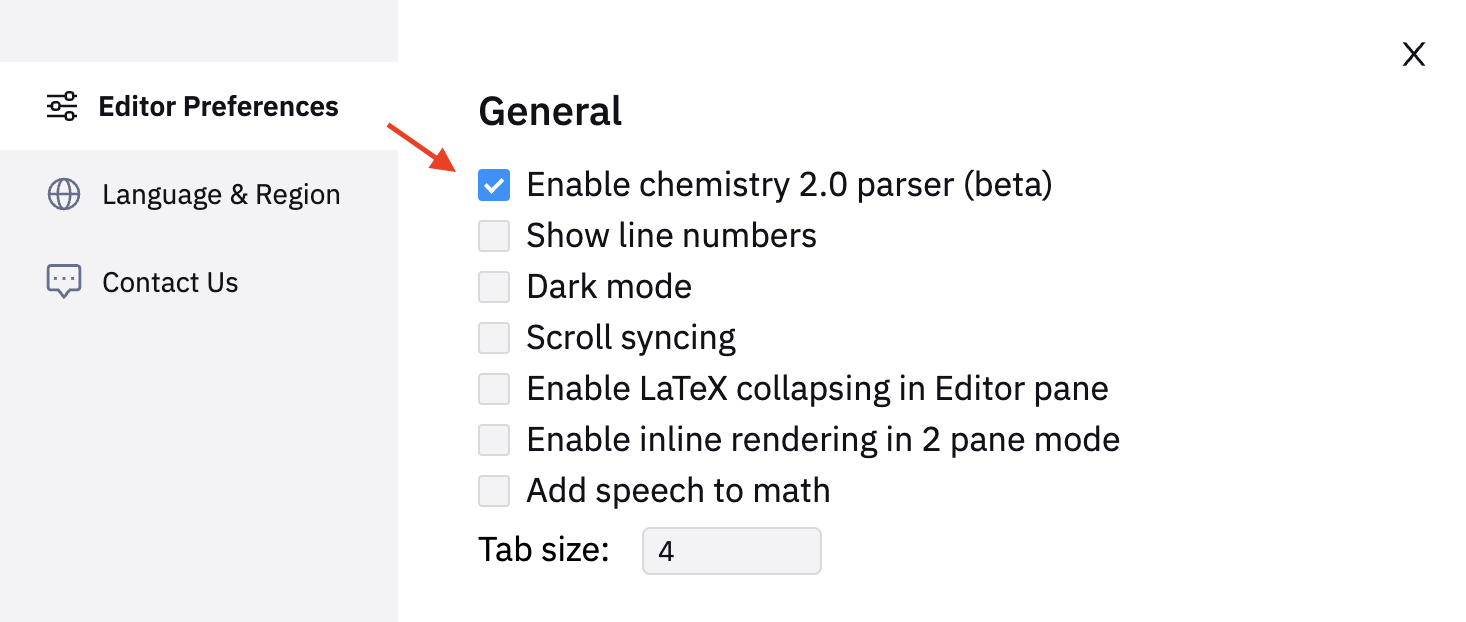
- Enable chemistry 2.0 (beta) with expanded chemistry output
January 2, 2024
- Support adding Snips to Folders
- Support bulk selection and deletion of Snips
June 22, 2023
- Search AI
- Fixed password reset bug
- Speed improvements for snipping images and PDFs
- Fixed DOCX exporting bugs
May 11, 2023
- Files tab and folders
- Selection mode and bulk actions
- Export tables to CSV
- Export PDFs to plain Markdown
- Improved chemistry algorithm
- Free admin seat for organizations
- Create Snip from text
- Improved Korean language recognition
- Faster PDF processing
- Improved Markdown style table outputs
April 5, 2023
- Improved table recognition
- Educational and free plan changes
- Institutional licenses for universities and colleges
- Improved robustness of PDF processing and PDF uploading
- Improved checkout flow for Alipay users
- Improved robustness of web and mobile apps
- Improved speed of exporting to DOCX
- Formatting improvements for tables (numbers no longer considered as math equations inside tables)
January 30, 2023
- PDF page selection
- Collaborative editing
- Auto-complete feature
- Support for proofs / theorems / lemmas / unnumbered sections in Mathpix Markdown
- Improved syntax highlighting for code blocks
- Support in Mathpix Markdown to configure image size
- Support for the LaTeX command
- Fixed conversion bugs for LaTeX and PDF with LaTeX for # and £ characters
- Fixed line ordering issue in PDF conversion
- Improved overall robustness of PDF conversion
October 25, 2022
- Better English handwriting support
- PDF data extraction
July 24, 2022
- Math to speech
- Handwritten PDF conversion
- Copy equations from PDFs
- Labeled buttons for accessibility
September 29, 2020
- Collapsible section feature
- Note templates
August 30, 2019
- Editor panel
- PDF Conversion
- Pasting images to Notes
- Sharing links
- Syncing with mobile app
MacOS
3.4.12 // February 28, 2025
New Features:
- Added a new feedback form to Settings
- Improved quality of screenshots on high PPI displays
- Optimized first sync process
Bug Fixes & Improvements:
- Extra row appearing in PNG and TIFF exports for tables
- Responsiveness issues when switching screens
- Table colors not updating with PNG/TIFF font setting
3.4.9 // October 3, 2024
- Improved Snips gallery view
- Added “Upload image” option
- Added copy buttons to code blocks and text selection to rendered text
- Added ability to open Snips and PDFs in the web app
- Added PDF to HTML conversion
- Fixed a bug where users were automatically logged out and received a “Missing access token” error
- Fixed a bug that prevented taking screenshots on macOS Sequoia
- Fixed a bug where Snip editing mode displayed low image quality on external monitors
3.4.8 // June 24, 2024
- Added PDF conversion
3.4.7 // April 3, 2024
- Fixed bug where not all Snips were displayed in the gallery view
3.4.6 // February 26, 2024
- Improved OCR of complex chemistry
- Added SVG, MOL and InChI output rows for chemical content
- Added tooltips to buttons
- Improved memory usage
- Bug fixes
3.4.5 // May 9, 2023
- Bugfixes
3.4.4 // May 5, 2023
- Bugfixes
3.4.3 // May 4, 2023
- Bugfixes
3.4.2 // December 1, 2021
- Full screen Snip view
- Fixed screen sliding effect after taking a screenshot
3.4.1 // November 15, 2021
- Significantly improved handwriting recognition, including disambiguating symbols based on context
- Improved table parsing accuracy
3.4 (340.7) // October 8, 2021
- In-app drawing with trackpad, touchscreen, or pen tablet
- Handwritten chemical diagram OCR
- Support for Bengali, Gujarati, Tamil
3.3 (212) // August 2, 2021
- Markdown format for tables
- Faster image uploads
- Updated widget settings
- Bug fixes & improvements
3.2 // June 2, 2021
- Improved stability
- Idiomatic equation array syntax option
- Chemical diagram search
3.1 (202) // February 24, 2021
- Beta chemical diagram recognition
- SMILES format row on OCR tab (ChemDraw compatibility)
3.0 (201) // February 4, 2021
- Export to DOCX file for individual Snips
- Search your Snips with a LaTeX string
- Customizable block mode math LaTeX delimiters
- M1/Apple Silicon support
- Ability to disable shortcuts
2.7.1 (192) // October 13, 2020
- Bug fixes & improvements
2.7 (188) // October 9, 2020
- Search tab
2.6.1 (185) // September 2, 2020
- OCR feedback
- Accounts tab in Preferences
- Number of Snips remaining for free users
- Solver tab & copy Solver result
- Tab & row memory
- Row toggling to copy MathML / copy PNG buttons
- Option to show original image on OCR & Data tabs
- Improved MathML support, MS Word format
2.5.1 (171) // August 7, 2020
- Bug fixes & improvements
Windows
03.00.0130 // February 26, 2025
New Features:
- Enabled SMILES code editing
- Added a feedback form for user input and suggestions
- Introduced a Snip grid view switch for better navigation
Bug Fixes & Improvements:
- Fixed PNG/TIFF exports missing a line in tables
- Fixed table content alignment in the rendered view
- Fixed issue where tables had an extra pixel when pasted into DOCX
- Fixed TIFF/PNG tables ignoring background colors
- Corrected export to DOCX to ensure the proper language setting
03.00.0118 // June 24, 2024
- Added PDF conversion
03.00.0114 // February 26, 2024
- Improved OCR of complex chemistry
- Added setting for Enhanced Diagram Data: enable to fetch SVG, MOL and InChI output rows for chemical content
- Added tooltips to buttons
- Changed CSV functionality to download a file
- Bug fixes
03.00.0104 // May 9, 2023
- Bugfixes
03.00.0093 // November 24, 2022
- Bugfixes
03.00.0092 // October 21, 2022
- Bugfixes
03.00.0083 // December 1, 2021
- Full screen Snip view
- Fixed screen sliding effect after taking a screenshot
03.00.0080 // November 15, 2021
- Significantly improved handwriting recognition, including disambiguating symbols based on context
- Improved table parsing accuracy
03.00.0074 // October 8, 2021
- In-app drawing with trackpad, touchscreen, or pen tablet
- Handwritten chemical diagram OCR
- Support for Bengali, Gujarati, Tamil
03.00.0050 // August 2, 2021
- Markdown format for tables
- Faster image uploads
- Updated widget settings
- Bug fixes & improvements
03.00.0020 // June 2, 2021
- Improved stability
- Idiomatic equation array syntax option
- Chemical diagram search
03.00.0009 // February 24, 2021
- Beta chemical diagram recognition
- SMILES format row on OCR tab (ChemDraw compatibility)
3.00.0006 // February 4, 2021
- Export to DOCX file for individual Snips
- Search your Snips with a LaTeX string
- Customizable block mode math LaTeX delimiters
02.07.0002 // October 9, 2020
- Search tab
2.06.00011 // September 28, 2020
- Bug fixes & improvements
2.06.0009 // September 3, 2020
- Solver tab & copy Solver result
- Tab & row memory
- Row toggling to copy MathML / copy PNG buttons
- Option to show original image on OCR & Data tabs
- Improved MathML support, MS Word format
02.05.0017 // August 7, 2020
- Bug fixes & improvements
02.05.0016 // August 2, 2020
- Show number of Free Snips remaining
- Bug fixes & improvements
02.05.0009 // June 9, 2020
- OCR feedback
- Image Export tab in Settings (PNG only): font color, background color, DPI
- Image Export presets optimized for different editors: MS Office, Google Docs, Google Slides, Typora, etc.
- Account tab in Settings
Linux
03.00.0093 // November 24, 2022
- Bugfixes
03.00.0092 // October 21, 2022
- Bugfixes
03.00.0083 // December 1, 2021
- Full screen Snip view
- Fixed screen sliding effect after taking a screenshot
03.00.0080 // November 15, 2021
- Significantly improved handwriting recognition, including disambiguating symbols based on context
- Improved table parsing accuracy
03.00.0074 // October 8, 2021
- In-app drawing with trackpad, touchscreen, or pen tablet
- Handwritten chemical diagram OCR
- Support for Bengali, Gujarati, Tamil
03.00.0050 // August 2, 2021
- Markdown format for tables
- Faster image uploads
- Updated widget settings
- Bug fixes & improvements
03.00.0021 // June 2, 2021
- New AppImage version of the app (new app must be redownloaded)
- Improved stability and compatibility with Linux operating systems
- Chemical diagram recognition, SMILES format
- Export to DOCX
- Search your Snips
- Custom block mode delimiters
- Idiomatic equation array syntax option
- Chemical diagram search
02.07.0002 // October 9, 2020
- Search tab
2.06.0009 // September 3, 2020
- Solver tab & copy Solver result
- Tab & row memory
- Row toggling to copy MathML / copy PNG buttons
- Option to show original image on OCR & Data tabs
- Improved MathML support, MS Word format
iOS
4.2.3 // November, 2025
- Bugfixes
4.2.2 // September, 2025
- SuperNet: Our latest, most-advanced layout parsing model. Better structure recognition, cleaner output, fewer errors with irregular layouts and noisy inputs.
- Larger PDF Size Limit: Increased from 100MB to 1 GB .
- Two-Factor Authentication: Added for extra security options.
- Direct PDF Conversion: Your uploaded PDFs can be converted to new PDFs (utilizing MMD content), without having to convert them to a Note first
- Revision History: You can now view revision history of your Notes.
- General Snip UI improvements
- Bug fixes
4.2.1 // May 17, 2024
- Bulk PDF and Snip upload
- Bugfixes
4.2.0 // Apr 5, 2024
- Chemistry 2.0 with expanded chemistry output
- Search AI on Home tab
- Localization in 14 languages
- Ability to choose font type and size when exporting Note to DOCX / PDF / LaTeX / HTML
- Gallery view in Snips tab
- Bulk Snip selection, deletion, and moving to Folders
- Note to PDF conversion enhancements
- New Usage tab in Settings
- Bugfixes
4.1.8 // Apr 30, 2023
- Files tab and folders
- Bulk actions
- Create Snip from Text
- Improved recognition of big tables
- Improved recognition of chemistry structures
4.1.7 // Mar 7, 2023
- Fixes for table rendering and exporting
- Fixes for AsciiMath
4.1.6 // Feb 18, 2023
- Updated Markdown rendering to support proofs and theorems
- Ability to select pages when uploading a PDF
- Mathpix widget for home screen
- Bugfixes
4.1.5 // Jan 27, 2023
- Create Snip from Snip result view
- Bugfixes
4.1.4 // Jan 24, 2023
- Collaborative editing for notes via note sharing menu; simple invite users to your note via email
- Home screen quick actions to create Snip quickly
- Bugfixes
4.1.3 // Dec 14, 2022
- Bug fixes when inserting Snips to documents from iPad
- Snip editing
- Palm rejection on full page drawing mode
- Upload PDF to Snip by using native sharing menu
4.1.2 // Nov 9, 2022
- Fixed usability bugs
- Select or copy text directly from PDF view
- App automatically opens last opened PDF or Notes and remembers last page for PDFs
4.1.1 // Oct 18, 2022
Fix syncing bug
4.1 // Oct 5, 2022
Performance improvements, added full page drawing mode with zoom in
4.0.1 // Aug 31, 2022
Bug fixes
4.0 // Aug 27, 2022
- Snip 2.0: support for PDFs and Notes
- Markdown Notes editor, with keyboard extension to insert math equations, drawings, or images directly into your document
- Export Notes and PDFs to Markdown / DOCX / LaTeX / PDF / Overleaf
- Built in PDF scanner with configurable image filters for background removal and contrast maximization
- Create a collection of PDFs that can be read or searched on any device
- Digital ink drawing mode for math equations with live update recognition and scratch to delete
- New Snip exporting options: Asciimath, MathML, Markdown (for tables)
3.7 // Jan 24, 2022
- Beta support for handwritten chemical diagrams
- Speed and performance improvements
3.6 // April 29, 2021
- Multitasking with image drag&drop on iPad
- Chemical diagram search
- Improved Apple Pencil support
3.5 // February 22, 2021
- Two new backgrounds for Draw mode
- OCR feedback
- Palm rejection for Apple Pencil
- Beta chemical diagram recognition
3.4 // November 16, 2020
- Pen, Eraser, Undo, and Redo functions in Draw mode
- Apple Pencil support, double-tap to change between pen and eraser
- Edit a previously drawn Snip
- Integration directly with iOS screenshot function
- Landscape support throughout the app
3.2 // October 6, 2020
- OCR tab
- Solver tab
- Tab & row memory
- Search tab
- Improved iPad support
- Snip / Photos integration
Android
6.1 // May 6, 2024
- Bulk PDF and Snip upload
- Improvements to the tablet landscape mode
- Bugfixes
6.0 // Apr 5, 2024
- General improvements:
- Chemistry 2.0 with expanded chemistry output
- Search AI on Home tab
- Localization in 14 languages
- Ability to choose font type and size when exporting Note to DOCX / PDF / LaTeX / HTML
- Gallery view in Snips tab
- Bulk Snip selection, deletion, and moving to Folders
- Note to PDF conversion enhancements
- New Usage tab in Settings
- Bugfixes
- Added support for Android 14
4.1.8 // Apr 30, 2023
- Files tab and folders
- Bulk actions
- Create Snip from Text
- Improved recognition of big tables
- Improved recognition of chemistry structures
4.1.7 // Mar 7, 2023
- Fixes for table rendering and exporting
- Fixes for AsciiMath
4.1.6 // Feb 18, 2023
- Updated Markdown rendering to support proofs and theorems
- Ability to select pages when uploading a PDF
- Bugfixes
4.1.5 // Jan 27, 2023
- Create Snip from Snip result view
- Bugfixes
4.1.4 // Jan 24, 2023
- Collaborative editing for notes via note sharing menu; simple invite users to your note via email
- Bugfixes
4.1.3 // Dec 14, 2022
- Snip editing
- Palm rejection on full page drawing mode
- Upload PDF to Snip by using native sharing menu
4.1.2 // November 11, 2022
- Fix bug inserting image to note
4.1 // October 17, 2022
- Copy text and math from PDFs
4.0 // August 30, 2022
- Snip 2.0: support for PDFs and Notes
- Markdown Notes editor, with keyboard extension to insert math equations, drawings, or images directly into your document
- Export Notes and PDFs to Markdown / DOCX / LaTeX / PDF / Overleaf
- PDF scanner for handwritten or printed pages
- Create a PDF collection that can be read / searched on any device
- Digital ink drawing mode for equations with live recognition and scratch to delete
- New Snip exporting options: Asciimath, MathML, Markdown
3.6 // June 5, 2021
- Chemical diagram OCR and search
- Enhancements to image cropping logic
- Bug fixes and stability improvements
3.5 // February 23, 2021
- Two new backgrounds for Draw mode
- OCR feedback
- Beta chemical diagram recognition
3.4 // December 4, 2020
- Pen, Eraser, Undo, and Redo functions in Draw mode
- Edit a previously drawn Snip
- Landscape support throughout the app
3.3 // October 14, 2020
- Search tab
3.2 // September 9, 2020
- OCR tab
- Solver tab
- Tab memory